The Difference between "Solving" and "Retargeting"
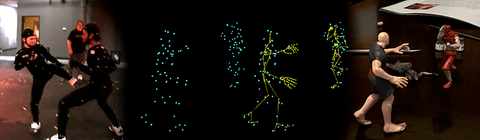
This question and the use of these terms comes up a lot in conversation, with new clients and industry folks. We mention it briefly in the FAQ's, and I thought I'd cover it here as well. "Solving" is taking typically optical mocap data, marker "cloud" files such as .c3d, .trc and others, and effectively translating it to create skeletal animation for a CG character. A breakdown for those not familiar with optical mocap:
An optical mocap system captures the movements of small markers placed at key positions all over an actor's body. The resulting data files contain a moving "cloud" of points; representing the motion of each marker on the actor, and named accordingly by body part and location. A CG skeleton is fitted inside and constrained to the cloud of points, placed where the now missing actor was, and the skeleton is then driven to move like the original actor.
In a quicker nutshell:
The actor's motion moves the markers.
The markers motion is captured, a moving cloud of points remains with the actor removed.
A CG skeleton is placed where the human actor was and moved by the dots, recreating the actor's original motion.
"Solving" is sometimes used interchangeably with the term "retargeting", which more specifically means translating and fitting animation between two separate and possibly different skeletons. Using an FBX skeleton animation and transferring it to another character's skeleton, Character>Character in Motionbuilder for example, is retargeting.
Many industry folks use the term retargeting for most any translation of motion from one character, face or other rig to another; whether it's marker cloud, skeletal, mathematical, etc. Retargeting does describe well any number of processes, and so be it. Potāto, Potäto as they say.
Why This Matters for Game Developers
So why should you care about the distinction? Because understanding what happens at the solve stage versus the retarget stage tells you a lot about the quality of the mocap data you're buying or working with. A bad solve is where most motion capture problems originate. If the skeleton wasn't properly fitted to the marker cloud, or the constraints were sloppy, you end up with data that looks "off" from the start — and no amount of retargeting cleanup downstream is going to fully fix that.
The number one reason mocap looks floaty or slidey in a game engine is poor solving. The feet don't plant properly, the hips drift, the weight shifts feel wrong. That's almost always a solve problem, not a retarget problem. Good solving preserves those subtle weight transfers — the way a person's center of mass shifts just before they step, the micro-adjustments in the spine when someone reaches for something, the way the whole body reacts to a hard stop. That stuff is what makes motion feel real, and it lives or dies in the solve.
Here at MoCap Online, all of our animations go through professional solving in MotionBuilder before any retargeting happens. We work with the raw optical data, fit skeletons properly, clean up any marker noise or occlusion issues, and make sure the solve is solid before we ever think about moving that data to another rig. It's one of those things that doesn't sound glamorous, but it's the difference between mocap that feels alive and mocap that feels like a puppet on strings.
Common Retargeting Pitfalls
Even with a clean solve, retargeting has its own set of headaches. Here are the ones we see most often:
- Proportion mismatches — This is the big one. Your source skeleton and target skeleton almost never have the same proportions. Longer arms on the target means hands that clip through hips. Shorter legs means feet that slide or hover above the ground. The retarget system tries to compensate, but it's working with what it's got. You need to know where your retargeter is going to struggle and plan for it.
- Loss of root motion data — Root motion (the actual translation of the character through world space) can get stripped or mangled during retargeting if your pipeline isn't set up to preserve it. This is especially painful for locomotion animations where you need the character to actually move forward the correct distance per cycle. If your retargeted walk looks fine in place but the character ice-skates in-engine, this is probably why.
- Hand and finger data corruption — Retargeting between rigs with different hand bone counts is asking for trouble. Going from a 3-bone-per-finger rig to a 2-bone setup, or vice versa, almost always produces mangled finger poses. If hand fidelity matters for your project, you need to verify the bone hierarchy matches or accept that you'll be doing manual cleanup.
- IK vs FK differences — If your source animation was authored or solved in FK (forward kinematics) and your target rig evaluates in IK (inverse kinematics), or the other way around, you can get knee pops, elbow flips, and other joint artifacts. The math is fundamentally different, and the transition points are where things break. This is especially common when moving data between DCC tools that handle IK/FK blending differently.
None of these are unsolvable problems, but they're the kind of thing you want to be aware of before you're three weeks into a project wondering why your character's arms keep punching through their own torso.
- Crispin
Modern Motion Capture Retargeting Workflows
Since this article was originally written, retargeting technology has advanced significantly. Modern game engines now include built-in retargeting systems that handle most of the complexity automatically. Unreal Engine 5 IK Retargeter uses full-body IK to intelligently map animations between skeletons of different proportions, preserving foot contacts, hand positions, and overall motion quality. Unity Humanoid Avatar system normalizes bone data into a canonical humanoid format for cross-rig compatibility.
The core concept remains the same: motion capture data is captured on one skeleton (the performer) and must be transferred to a different skeleton (your game character) while preserving the quality and intent of the original performance. MoCap Online animations use standard humanoid bone hierarchies that map cleanly to both engine retargeting systems without manual bone assignment.
Common Retargeting Issues and Solutions
The most frequent retargeting problems are twisted limbs (caused by bone roll mismatches), foot sliding (caused by IK chain differences), and proportion artifacts (caused by significant size differences between source and target skeletons). Most of these resolve by ensuring your character rig follows standard humanoid conventions and your retarget reference pose is configured correctly. For specific setup instructions per engine, visit our getting started guide and animation resources.
Retargeting Quality Control: Validating Results and Fixing Common Artifacts
A technically successful retarget — one where the software reports no errors — does not guarantee a visually correct result. Retargeting algorithms minimize bone rotation error according to their internal cost functions, which are designed for average humanoid proportions. When your target character deviates from that average — unusual limb lengths, a non-standard spine joint count, or custom twist bone chains — the retarget produces plausible-looking but incorrect results that require human review to catch. The most reliable quality control workflow is to retarget a known-good locomotion cycle first, then inspect it against the source animation frame-by-frame at three points: the idle rest pose, the peak of movement (highest velocity frame in a run cycle), and the contact frames (foot plants in locomotion, impact frames in combat). Errors at the rest pose indicate a reference pose mismatch; errors at peak motion indicate proportion compensation failures; errors at contacts indicate IK override or foot locking problems in the retarget setup.
Shoulder artifacts are the most common retargeting failure in practice, and they almost always trace to a mismatch in the clavicle or shoulder bone orientation between source and target skeletons. When a retargeted character's shoulders appear to roll forward or the arms rest at an unnatural angle during idle poses, inspect the bind pose orientation of the clavicle bones on both the source skeleton and your target. If the clavicle bones point in different directions in the two skeletons — a common result when one skeleton was rigged in Maya and the other in Blender with different axis conventions — no amount of bone mapping adjustment resolves it at the retarget level. The correct fix is to adjust the reference pose on one skeleton to match the other's clavicle orientation before establishing the retarget mapping. Attempting to compensate with offset rotation values in the retarget mapping produces results that look correct at the reference pose but break at extreme arm positions.
Finger and facial animation data does not retarget reliably through standard bone-based retargeters. Finger retargeting requires explicit joint count matching between source and target — if the source skeleton has three joints per finger and the target has two, the retarget drops one joint's data, producing rigid or incorrectly articulated fingers. The practical solution for game animation is to strip finger animation data from the retarget entirely and drive hands through a small set of hand poses (open, closed, grip, point) that are blended procedurally based on the hand's current interaction state. This approach is more robust than retargeted finger data, works correctly with any hand proportion, and allows the same hand behavior to be used across multiple character types without retarget reconfiguration. MoCap Online packs that include hand animation data are structured with this workflow in mind — the finger data is available for direct use on the standard skeleton but can be excluded from custom retarget passes without affecting the body animation quality.
Motion Capture Solving in Plain Terms: How Raw Sensor Data Becomes an Animation
Solving is the process that converts raw sensor measurements — accelerations, rotations, and optional position data — into a coherent skeleton pose for each frame. Raw inertial sensor data describes what each sensor experienced physically, but it does not directly describe joint angles. The solving step interprets the sensor relationships to reconstruct a physically plausible skeleton pose consistent with the sensor readings. The solving quality determines how closely the reconstructed pose matches what the performer actually did.
Professional solving systems apply biomechanical constraints — a human knee cannot hyperextend, a shoulder has limited range — to filter physically impossible poses from the reconstruction. This is why professionally solved data has clean, natural joint behavior even when raw sensor data contained artifacts. Consumer-grade solving software with less detailed biomechanical models occasionally accepts impossible poses because the constraint system is less complete. The difference between well-solved and poorly-solved data is visible in the wrists, ankles, and spine — the joints most prone to constraint violations. Professionally processed motion capture packs include this solving work already completed.