
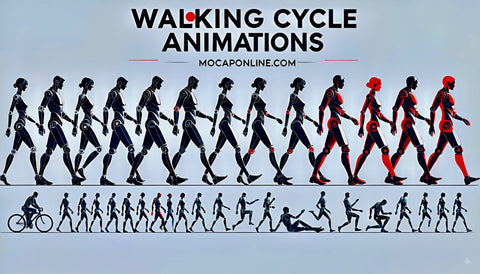
Walk cycle animation is the backbone of every third-person game, action RPG, simulation, and interactive experience that features a humanoid character. Before a character runs, fights, stumbles, or celebrates — they walk. Get the walk cycle wrong and every other animation in your project feels slightly off. Get it right and your characters feel grounded, believable, and alive from the very first frame.
This guide covers everything a developer or animator needs to know: the technical anatomy of a walk cycle, the different types your game needs, how motion capture compares to keyframe animation for locomotion, and how to drop walk cycle animations directly into Unreal Engine 5 and Unity.
What Is a Walk Cycle?
A walk cycle is a looping animation sequence that simulates a character moving forward at a walking pace. When the first frame and the last frame connect seamlessly, the animation loops indefinitely — giving the illusion of continuous forward movement while the character stays in place (or is driven by root motion through the game world).
The term "cycle" is key. A full walk cycle covers two complete steps — one full stride with the left foot leading, one full stride with the right foot leading — before returning to the starting pose. This symmetry is what allows the loop.
The 8 Key Poses
Walk cycles are traditionally broken down into eight distinct contact and passing poses. Understanding these is essential whether you are evaluating purchased motion capture animations or diagnosing why a custom keyframe animation looks wrong.
- Contact (Right) — Right heel strikes the ground. Left arm swings forward. This is the anchor pose.
- Down (Right) — Body lowers slightly as right foot takes weight. Left foot lifts off.
- Passing (Right) — Left leg passes the right. The body is at its lowest point. The "crossing" moment.
- Up (Right) — Right leg pushes forward. Body rises to its highest point.
- Contact (Left) — Left heel strikes the ground. Right arm swings forward. Mirror of pose 1.
- Down (Left) — Body lowers as left foot takes weight.
- Passing (Left) — Right leg passes the left.
- Up (Left) — Left leg pushes forward. Body at highest point again.
Most walk cycles run at 24–30 frames per second. At 24fps, a standard walk cycle typically covers 24–32 frames (1–1.3 seconds per full cycle). At 30fps, 30–40 frames is common.
The Anatomy of a Realistic Walk Cycle
Technically correct eight-pose timing is necessary but not sufficient for a convincing walk. The secondary motion — the nuance that separates professional motion capture from amateur keyframe work — lives in four specific systems.
Weight Shift
As each foot makes contact with the ground, the body's center of mass shifts laterally over that foot. The pelvis tilts subtly side to side with each step. Without this lateral shift, characters appear to slide rather than walk. The magnitude of this shift defines a great deal of character personality — a confident character has minimal lateral sway; an exhausted or overloaded character has pronounced sway.
Arm Swing
Arms swing in opposition to legs. When the right foot contacts the ground, the left arm is forward. This counter-rotation reduces rotational momentum and is a deeply ingrained biomechanical reflex. The arm swing should originate from the shoulder, not the elbow. Natural arm swing covers roughly 30–45 degrees of arc for a relaxed walk.
Head Bob
The head bobs vertically in sync with the body's rise and fall. It also has a subtle horizontal component as the body rotates through each stride. For game characters, this movement is often exaggerated slightly to read at distance or in third-person perspective.
Hip Rotation
The pelvis rotates forward on the side of the stepping leg. As the right leg steps forward, the right hip rotates forward with it. This hip rotation is what creates natural stride length. Animation rigs that lock the pelvis rotation will always look mechanical.
In professional motion capture data, all four of these systems are captured simultaneously and naturally. Recreating them by hand in keyframe animation is time-intensive and requires significant experience to match the organic quality of capture data.
Types of Walk Cycles Your Game Needs
Most games require considerably more than a single walk animation. A complete locomotion system for a humanoid character typically includes multiple walk variants to cover different movement states and directions.
Standard Walk
The baseline. Neutral, upright posture, moderate pace. This animation carries the most screen time of any locomotion clip, which makes quality and seamless looping non-negotiable. For a third-person game, this clip will play during exploration, dialogue, low-stakes traversal, and any moment the player is not sprinting or in combat.
Look for: clean heel-to-toe contact, natural arm swing arc, consistent loop point with no pop or snap.
Sneak/Crouch Walk
Lowered center of mass, slow deliberate foot placement, reduced arm swing, weight concentrated on the balls of the feet rather than the heels. Essential for stealth games, and useful in any game with cover or exploration mechanics.
The crouch walk requires a distinct foot contact pattern from the standard walk — heel strikes are typically eliminated in favor of ball-of-foot or toe contact to simulate quiet movement.
Injured/Limping Walk
Asymmetric gait favoring one leg. The injured side has reduced weight-bearing time, shorter stride, and visible compensation in the torso and shoulder. This animation is used for health state feedback, wounded NPCs, and narrative moments.
A convincing limp requires the non-injured side to show compensatory over-extension — the body tries harder on the good leg to protect the bad one.
Carrying Walk
Arms forward or down holding a load, spine slightly forward-flexed, reduced arm swing, wider stance. Required for any character carrying weapons, supplies, or interacting with physics objects. The spine flexion angle and arm position should vary with the weight of the implied load.
Direction Variants: Strafe Left/Right, Walk Backward
For games with free camera or cover systems, you need the full eight-direction movement set. Strafe animations maintain forward-facing body orientation while translating laterally. Backward walks use a distinct gait — shorter stride, more caution, different arm position.
These variants are essential for locomotion blend trees. Without them, characters snap to forward-facing orientation when moving laterally, which breaks immersion immediately.
Keyframe vs. Motion Capture Walk Cycles — Which Is Better?
Both approaches produce usable walk cycles. The question is time, budget, and what "quality" means for your specific project.
Keyframe walk cycles are built pose by pose by an animator. The advantage is complete artistic control — you can push exaggeration, stylize timing, and create movement that would be impossible or impractical to capture. Stylized games (platformers, cartoons, hand-crafted indie titles) often benefit from keyframe locomotion. The disadvantage is time: a single production-quality walk cycle with proper secondary motion can take a skilled animator 1–3 days.
Motion capture walk cycles record actual human movement and translate it to a rig. The result is organic, physiologically accurate weight and timing that is genuinely difficult to replicate by hand. The base data is captured in hours. The disadvantage historically was cost — capture sessions require equipment, studio space, and post-processing. That barrier has dropped significantly with professional animation pack libraries.
For most indie and mid-size game projects, the practical answer is motion capture for the locomotion foundation. Walk cycles, run cycles, and idles are your most-played animations and benefit most from organic quality. Custom or stylized keyframe animations are then layered on top for specific actions where you need precise creative control.
MoCap Online's animation packs include professionally captured walk cycles in FBX, BIP, Unreal Engine, Unity, and iClone formats — optimized for game engines and ready to drop into a locomotion state machine. You can start with the free pack to test compatibility with your rig before purchasing a full collection.
How to Set Up Walk Cycle Animations in Unreal Engine 5
UE5's animation system centers on the Animation Blueprint and blend spaces. Here is the baseline setup for a walk cycle in a locomotion state machine.
1. Import your FBX. Right-click in the Content Browser, select Import. Point to your walk cycle FBX. In the import dialog, assign the target skeleton (UE5 Mannequin or your custom skeleton). Check "Import Animations." Confirm import.
2. Create a Blend Space 1D. In the Content Browser, right-click, Animation, Blend Space 1D. Assign your skeleton. Set the axis to Speed (0 to max walk speed, typically 0–250 cm/s for a standard walk). Drop your Idle animation at 0 and your Walk animation at the target walk speed value.
3. Open your Animation Blueprint. In the AnimGraph, drag in the blend space. Connect it to the Output Pose. In the Event Graph, get the character's velocity, calculate its length, and pass it to the blend space's Speed parameter.
4. Add a State Machine. For a more complete system, replace the direct blend space with a State Machine. Create Idle, Walk, and Run states. Define transitions based on speed thresholds. This gives you clean transitions and expandability for additional locomotion states.
5. Set up root motion. If your walk cycle FBX includes root motion (the character moves during the animation), enable "Enable Root Motion" in the animation asset and "Root Motion from Everything" or "Root Motion from Montages Only" in the Animation Blueprint, depending on your movement approach.
The key UE5-specific consideration: ensure your walk cycle's root bone naming matches your skeleton's root. The UE5 Mannequin expects `root` → `pelvis` hierarchy. Mismatches here cause the T-pose issue covered in the FAQ below.
How to Set Up Walk Cycle Animations in Unity
Unity's locomotion setup uses the Animator Controller and, for smooth speed-based blending, a Blend Tree.
1. Import your FBX. Drag the FBX into your Assets folder. Select it in the Project panel, go to the Rig tab, set Animation Type to Humanoid (for standard humanoid rigs). Apply. Go to the Animations tab and confirm the walk cycle clip is listed.
2. Configure the clip. Select the walk cycle clip. Enable "Loop Time" and "Loop Pose." Set "Root Transform Rotation" and "Root Transform Position (Y)" to "Based on Original" for an in-place walk. Or configure root motion if your clip includes it.
3. Create an Animator Controller. Right-click in the Project panel, Create, Animator Controller. Open it and create a "Speed" float parameter.
4. Create a Blend Tree. Right-click in the Animator window, Create State, From New Blend Tree. Double-click to enter the Blend Tree. Set the parameter to "Speed." Add motion fields for Idle (speed 0) and Walk (speed at your walk threshold, e.g., 0.5).
5. Drive from code. In your character controller script, call `animator.SetFloat("Speed", currentSpeed)` each frame. Unity smoothly interpolates between Idle and Walk based on the value.
For Unity 2023 and later, the Animator Controller workflow is unchanged, but consider evaluating the new Animation Rigging package for additive procedural layers on top of your mocap base.
FAQ
How many frames is a walk cycle?
A standard walk cycle at 30fps runs 30–40 frames (1–1.3 seconds). At 24fps, 24–32 frames is typical. The exact length depends on the character's intended walk pace. A slow, deliberate walk may run 40–48 frames; a brisk walk 24–28 frames. Motion capture data is often delivered at the native capture rate (usually 60fps or 120fps) and re-timed to your project's target rate in engine.
What makes a walk cycle look realistic?
The key factors are weight shift (lateral pelvis tilt), opposing arm-leg swing, hip rotation through the stride, and consistent foot contact with no sliding. Secondary motion — spine flex, subtle head movement, shoulder counter-rotation — is what separates a technically correct walk from a convincing one. Motion capture data captures all of these simultaneously because it records actual human physics.
Can I loop a motion capture walk cycle?
Yes, provided the clip was exported with looping in mind. Quality motion capture walk cycles are trimmed so the first and last frames align in pose and position. In Unreal Engine, enable "Loop" in the animation asset settings. In Unity, check "Loop Time" and "Loop Pose" in the animation clip import settings. A correctly looped in-place walk cycle plays indefinitely with no visible pop at the loop point.
What is the difference between a walk and a run cycle?
Beyond speed, the biomechanical distinction is whether both feet are ever simultaneously in the air. In a walk, at least one foot is always in contact with the ground. In a run, there is a "flight phase" where neither foot contacts the ground. This produces a fundamentally different animation rhythm, a more pronounced forward lean, more aggressive arm drive, and higher vertical oscillation of the center of mass.
Are walk cycle animations compatible with any character rig?
Walk cycle animations are bound to a specific skeletal hierarchy. Out of the box, a motion capture animation works on a rig that matches the capture skeleton's bone names and hierarchy. To use it on a different rig — say, transferring a UE5 Mannequin-targeted animation to a custom character — you use retargeting. Unreal Engine 5 has a native IK Retargeter that handles this. Unity's Humanoid rig type abstracts bone mapping, allowing Humanoid-tagged animations to transfer between any Humanoid character. MoCap Online packs are delivered in multiple formats specifically to minimize retargeting overhead.
Conclusion
The walk cycle is the most-played animation in almost every game that has a playable character. Investing in high-quality, professionally captured walk cycles pays dividends across your entire project — every moment your player is exploring, traversing, or simply existing in your world is a moment they are watching that animation.
MoCap Online carries an extensive library of locomotion animations including standard walks, direction variants, sneak walks, combat walks, and more — all professionally captured and delivered in FBX, Unreal Engine, Unity, Blender, and iClone formats.
Browse the full animation library or download the free animation pack to test a set of locomotion animations with your character rig before committing to a full collection.
Walk Cycle Animation Packs for Game Developers
All walk cycle animations on this page are available as professional motion capture data, ready to import into your project:
- Zombie Walk Cycles — slow lurch, stagger, and undead crawl variations for horror games
- Combat Character Walk Cycles — aggressive approach walks and combat stances included with the Punch pack
- Browse the Full Animation Library — 300+ motion capture animations across all character types
- Free Starter Pack — download a free sample before buying to test compatibility with your rig
Every walk cycle ships in FBX, BIP, Unreal Engine, and Unity formats so you can import directly without conversion.
Related Resources
- Walking Animation Packs — Full walk cycle library
- Running Animations — Complementary locomotion
- Idle Animations — Standing idles for locomotion systems
- Game Character Animation Guide — Motion capture vs keyframe for locomotion
- Download Free Animation Pack
Related Articles
- What is Motion Capture? A Complete Guide for Game Developers
- FBX Animation: The Definitive Guide for Game Developers
- Unity Motion Capture Animation: Complete Integration Guide
- How to Use Motion Capture Animations in Unreal Engine 5
- Browse All Motion Capture Packs
Available Animation Formats
MoCap Online animations are available in all major formats:
A well-crafted walk cycle is the foundation of character locomotion. Subtle details like heel strike timing, hip sway, and arm counter-swing communicate weight and personality before a character ever speaks. Motion capture walk cycles provide a biomechanically accurate base that animators can layer style onto.
Creating convincing walk cycles for games requires attention to the biomechanical details that differ between character types. A heavily armored knight walks differently than an agile rogue, and both move differently than a civilian NPC carrying groceries. These differences show up in stride length, arm swing amplitude, torso lean, and ground contact timing. Motion capture makes it practical to record distinct walk styles for each character archetype rather than reusing a single generic cycle across the entire cast.
Blending between walk and run cycles is one of the most common animation challenges in third-person games. Players expect seamless acceleration and deceleration as they push the analog stick, without visible pops or foot sliding between speed tiers. Blend spaces built from multiple captured speeds, such as slow walk, normal walk, fast walk, jog, and sprint, give the locomotion system enough data points to interpolate smoothly across the full range of player input.
Directional movement adds further complexity, requiring forward, backward, and lateral walk variations plus smooth transitions between them. Strafing animations, turn-in-place clips, and start and stop transitions round out a complete locomotion set that handles all the input combinations players throw at it during gameplay. Each of these clips benefits from motion capture data that preserves the natural weight shifts and balance adjustments a real person makes when changing direction mid-stride.
Incline and surface variation animations extend a walk cycle library beyond flat-ground locomotion. Walking uphill requires a forward lean and shorter stride, walking downhill shifts weight backward with a braking motion, and traversing uneven terrain introduces lateral weight adjustments that keep the character balanced. Games that feature natural outdoor environments benefit from having dedicated incline walk sets that blend based on the surface normal angle beneath each foot, preventing the character from appearing to float or slide on slopes.
Footstep synchronization with audio and effects systems brings walk cycles to life beyond the visual motion. Each foot contact frame triggers material-specific sound effects for grass, stone, metal, wood, and other surfaces, plus optional particle effects like dust clouds, puddle splashes, or snow displacement. These secondary feedback elements are timed to animation notify events embedded in the motion capture clip data, ensuring the audiovisual presentation stays synchronized even when playback speed varies due to blend space interpolation.
Walk cycle quality directly impacts the player first impression of character control because locomotion is the most frequently seen animation in any game. Players spend the majority of their play time watching their character walk or run through the world, so even small imperfections in weight distribution, foot sliding, or knee popping are noticed quickly and repeatedly. Investing in a comprehensive set of high-quality motion capture walk cycles pays dividends throughout the entire development process by establishing a polished movement foundation that elevates every other animation system built on top of it.
