

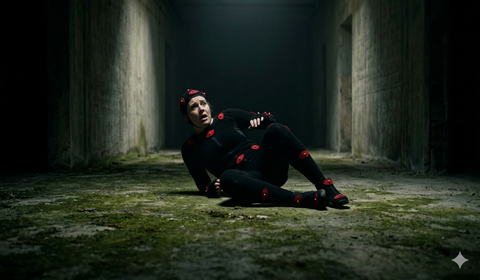
Horror is the genre where animation does the most emotional heavy lifting. In a shooter, an animation that's slightly off gets polished away by explosions and sound design. In a horror game, that same slightly-off animation becomes unbearable to watch — and not in the good way. Players notice everything. The way a zombie tilts its head before lunging. The inhuman smoothness of a ghost gliding through a doorframe. The micro-pause before a monster screams.
Great horror animation weaponizes the uncanny valley rather than trying to escape it. This guide breaks down how to use motion capture to create terror — from choosing the right movement style for your creature type, to implementing jump scares with frame-precise timing.
Why Animation Is the Core of Horror
Sound design and lighting are frequently cited as the pillars of horror game atmosphere. They matter enormously — but animation is what delivers the emotional gut-punch in the critical moment.
Consider: a jump scare is literally nothing without the animation. The monster must move. How it moves determines whether the player screams or laughs. Too fast and it reads as a sprite pop. Too slow and the player has time to feel annoyed rather than afraid. The animation is the scare.
Ambient animation — what a creature does when it's not attacking — is equally important. A zombie that stands still in its patrol route feels like an obstacle. A zombie that breathes irregularly, twitches a shoulder, and occasionally turns its head as if it hears something feels alive in the worst possible way.
Zombie vs. Ghost vs. Monster: Movement Philosophy by Creature Type
Horror enemies are not interchangeable. Each archetype has a movement vocabulary that communicates specific types of threat.
Zombies: Corrupted Humanity
The horror of a zombie comes from recognizing something human in something that isn't anymore. zombie animation pack should retain fragments of human movement while distorting them:
- Gait corruption — dragging a leg, favoring one side, asymmetric arm swing
- Head behavior — the head lolling, snapping toward sound, tilting at wrong angles
- Reach — arms outstretched, grasping motion carried over from human grab instincts
- Clustering — idle animations should suggest awareness of nearby undead, not autonomous individual behavior
Mocap data from real performers captures this human-but-wrong quality better than hand-keyed animation because the performer's natural movement rhythms come through even when the motion is heavily distorted in cleanup.
Ghosts: Violation of Physics
Ghost horror works by violating movement rules the player's brain takes for granted:
- No foot contact — floating slightly above floor level, no weight shift on footsteps
- Wrong speed — either impossibly slow (patient, inevitable) or supernaturally fast (sudden teleport-like movement)
- Backward movement — ghosts that walk backward toward the player, facing away
- Environmental defiance — passing through obstacles, appearing in wrong positions relative to where they were
Ghost animations often work best when base mocap data is cleaned and then deliberately distorted — removing the foot IK, adding floating procedural motion, or playing animations at fractional speed.
Monsters: Pure Predator
Original monster designs (non-humanoid or heavily mutated) have more animation freedom. Key principles:
- Secondary motion — tentacles, appendages, and loose flesh that move independently
- Weight — large monsters should move with physical inevitability. A run that shakes the camera feels terrifying. A floaty run feels like a costume.
- Animal reference — spider, snake, and big cat locomotion patterns applied to humanoid skeletons create deep uncanny valley responses
Procedural vs. Mocap for Horror Characters
Not every horror animation should come from motion capture. The choice between procedural and mocap depends on the specific horror effect you're after.
When Mocap Wins
- Humanoid enemies — zombie shuffles, cultist attacks, possessed humans benefit enormously from real human motion data
- Emotional cutscenes — survivor dialogue, death animations, and story moments need human nuance
- Combat sequences — attack and hit reaction timing that feels physically grounded
When Procedural Wins
- Inverse kinematics for limb placement — let a monster's hands place precisely on walls as it crawls
- Look-at systems — heads that track the player with precision beyond what a single animation clip can provide
- Environmental deformation — cloth, flesh, and secondary body parts responding to physics
- Speed variance — procedurally adjusting locomotion speed without creating animation pops
The most effective horror characters use both — mocap as the base layer with procedural systems layered on top.
Recommended Packs for Horror Games
The MoCap Online zombie and horror collection provides professionally captured animations from real performers in controlled environments. Key packs for horror projects include:
- Zombie packs — idle shuffles, patrol walks, attack lunges, death animations, crawl states, and ambient twitches captured with authentic human corruption
- Death animation sets — multiple directional deaths (shot from front, back, sides), collapse variants, and slow deaths for dramatic effect
- Combat hit reactions — flinches, stagger, and ragdoll-entry poses compatible with physics blending
Browse the full horror animation library: Zombie & Horror Animation Collection
Gore and Death Animations
Death animations are the punctuation mark on combat. Get them wrong and every kill feels deflating.
Directional Deaths
At minimum, ship four directional death animations — front, back, left side, right side. Players notice when every death looks the same regardless of where the killing blow came from. In Unreal Engine, use the Impact Direction parameter from damage events to select the appropriate death animation.
Slow Deaths
For boss characters and dramatic moments, slow death animations that take 3–5 seconds give weight to significant kills. Capture these with performers who can convey agony through body language — collapsing in stages, reaching for something, clutching the wound location.
Physics Blending
The smoothest death system blends from an animation to ragdoll physics. In Unreal Engine, use the Set All Bodies Below Simulate Physics node triggered by a notify at the peak of the death animation, with a blend weight curve from 0 to 1 over 0.2–0.5 seconds. This prevents the jarring snap from animation to ragdoll.
Ambient Animations: The Unsung Horror Tool
Idle animations in horror games do more work than in any other genre. A zombie standing completely still is not scary. A zombie that breathes wrongly — too deep, too rhythmic — is deeply unsettling.
Building an Ambient Animation Stack
- Base idle — 4–8 second looping clip with minimal movement
- Fidget variations — 3–5 alternative idles that play randomly: head turn, shoulder shift, arm drop
- Alert idle — tense variant that plays when the enemy detects something but hasn't found the player
- Breathing additive — subtle additive layer that makes the chest rise and fall even during attack animations
Play ambient animations with randomized delays (2–8 seconds between fidgets) and never let the base idle loop more than twice before triggering a variation. Repetition breaks immersion.
Implementing Fear Reactions (Player Character)
The player character's animation system can also deliver horror. When the player is grabbed, chased, or injured, the character's movement communicates their vulnerability.
Grab and Struggle Animations
If your game includes grab mechanics (zombie grabs player, player must escape), you need:
- Player grab entry — body jolts, balance lost
- Struggle loop — frantic small movements while player mashes input
- Escape animation — successful throw-off
- Fail/death animation — if the player doesn't escape in time
These require two-character synchronized animations if the zombie and player are in contact. Alternatively, trigger a camera effect and play separate animations for each character that read as plausible in tandem.
Low Health States
Blend in injured locomotion as player health drops — limping walk, hunched run, slower crouch speed. This communicates desperation without any UI element needed.
Jump Scare Timing: Frame-Level Precision
A jump scare is a timing problem. The monster must appear and move in a specific sequence:
- Silence or false relief — the moments before that prime the startle
- Sudden appearance — the monster enters frame or becomes visible
- Fast initial movement — a lunge, roar, or slam in the first 8–12 frames
- Sustained movement — the monster continues toward the player
The animation for step 3 is critical. It must play at full speed or faster (use time dilation or a separate faster-playback animation) with sound timed to frame 1 or 2 of the lunge. Any desync between audio and animation breaks the scare.
Technical Implementation
In Unreal Engine, trigger jump scares with a Sequence node that simultaneously:
- Forces the Animation Blueprint into the Lunge state
- Plays the jump scare audio through a non-spatialized channel (so it hits regardless of distance)
- Triggers a camera shake
- Disables player input for the duration of the trigger animation
The input disable is important — players who can still move during a jump scare animation feel less trapped and less scared.
Unreal Engine 5 vs. Unity for Horror Animation
UE5 Advantages for Horror
- Lumen global illumination — dynamic lighting changes that react to flickering lights, candles, and monster proximity
- Motion warping — attacks that warp to hit exact positions feel more threatening
- Control Rig — procedural IK and corrective shapes in-engine without returning to a DCC tool
- Chaos physics — integrated physics for ragdoll and destructible environments
Unity Advantages for Horror
- Smaller build sizes — important for downloadable horror games where file size affects conversion
- Cinemachine integration — procedural camera systems for horror cinematography built-in
- Accessibility — easier entry point for solo horror developers
- Asset Store — large ecosystem of horror-specific assets and systems
Frequently Asked Questions
Q: How do I make a zombie feel genuinely scary rather than just dangerous?
Prioritize ambient and patrol behavior over attack animations. Players fear what they don't understand. A zombie that moves unpredictably in patrol — stopping suddenly, changing direction, tilting its head — creates dread before any attack happens. Pack several idle fidget variations and randomize them.
Q: Can I use the same mocap skeleton for both the player character and zombie enemies?
Yes, and this actually simplifies development. Using the same skeleton base for all humanoid characters means animations can be shared, retargeted, or blended across characters without conversion steps. It also simplifies two-character interaction animations like grabs.
Q: How do I handle zombie crowds without destroying performance?
Use Unreal Engine's Animation Budget Allocator to throttle update rates for distant zombies. Off-screen zombies can run at 5–10 fps animation updates without any visible difference. Only the 3–5 zombies closest to the camera need full 60 fps animation evaluation.
Q: What frame rate should jump scare animations target?
Capture and play at 60 fps minimum. The high frame rate during the sudden movement makes it read as genuinely fast rather than low-budget. If your game runs at 30 fps, this is one place to consider a temporary frame rate boost or a pre-baked cutscene.
Q: Are there royalty-free horror mocap packs that work commercially?
Yes. MoCap Online provides commercially licensed horror and zombie animation packs. The standard license covers all commercial game releases. Review the license documentation for edition-specific details.
Get Your Horror Animations
Stop hand-keying zombie shuffles. Use professionally captured motion data from real performers — the human movement underneath the horror is what makes it work.
Browse the Zombie & Horror Animation Collection
New to MoCap Online? Start with the free pack and test it in your project before committing to a full purchase:
Download the Free Animation Pack
Related Articles
- Zombie Animation Pack: Everything for Your Horror Game
- What is Motion Capture? A Complete Guide for Game Developers
- Motion Capture Animation Packs: The Complete Buyer's Guide (2026)
- FBX Animation: The Definitive Guide for Game Developers
- Browse All Motion Capture Animation Packs
Horror game animation depends on manipulating the player's expectations of normal human movement to create unease and dread. Subtle deviations from natural motion, such as a character's head turning slightly too fast, limbs bending at uncomfortable angles, or a walking gait that stutters unpredictably, trigger instinctive discomfort in players. Motion capture provides the foundation of normal movement that these horror variations distort, because the uncanny effect requires a baseline of recognizable human motion to be effective.
Environmental storytelling through animation is particularly powerful in horror games where silence and isolation amplify every movement. A chair that rocks by itself, a shadow that shifts independently of its source, or a door that opens at an unnaturally smooth pace all communicate threat without requiring explicit enemy encounters. Capturing reference movements for these environmental animations ensures they carry enough physical realism to feel like something caused them, which is more disturbing than obviously artificial motion.
Enemy animation in horror games often benefits from a combination of motion capture and procedural modification. Capturing a human actor performing threatening movements provides the organic base, while runtime modifications like joint limit violations, speed variations, and unnatural pauses transform the performance into something inhuman. This approach is more effective than purely procedural creature animation because the underlying human movement patterns create a recognizable foundation that the distortions violate in psychologically impactful ways.
Player character animation in horror games serves a critical role in communicating vulnerability and fear. Panicked breathing animations, stumbling recovery from scares, shaking hands when holding items, and increasingly frantic movement as threat levels rise all reinforce the player's emotional state through their character's body language. Motion capture captures these fear responses authentically because actors draw on real physical reactions to stress, producing trembling, hunching, and defensive postures that would be difficult to convincingly keyframe.
Horror game animation relies heavily on breaking the expectations that players have developed from watching natural human movement. Motion capture data can be intentionally degraded, time-stretched, or layered with procedural noise to create uncanny valley effects that trigger instinctive discomfort. Capturing a performer moving naturally then applying inverse kinematics constraints that subtly violate joint limits creates movements that look almost human but trigger the player's unconscious recognition that something is fundamentally wrong.
Environmental animation in horror games often goes underappreciated but contributes significantly to atmosphere. Subtle animations on ambient objects, flickering light sources with irregular timing patterns, and barely perceptible movement in peripheral vision areas create persistent unease. Motion capture can enhance these environmental elements by recording slow, deliberate movements for interactive objects that maintain the weight and physicality players subconsciously expect from real-world interactions.