

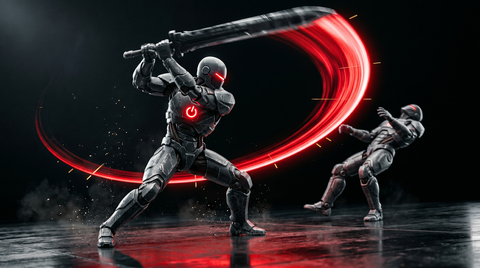
Sword animation is the art form at the intersection of choreography, physics simulation, and game feel engineering. A sword swing that looks brilliant but connects at the wrong frame will feel terrible. A technically perfect hitbox that plays against a weak animation will never excite players. Great melee animation solves both simultaneously — and this guide shows you how.
Whether you're building a fantasy RPG, a souls-like action game, or a historical combat simulator, the principles of sword animation and melee weapon animation are consistent. This guide covers weapon weight handling, attack phases, hitbox alignment, combo systems, parry design, weapon trails, and enemy reactions — everything you need to build a satisfying sword combat system.
Weapon Weight and Handling Styles
The first decision in melee animation is establishing the weight and handling style of each weapon class. Weight determines speed, arc, and recovery time — all of which are encoded in the animation before a single combat number is balanced.
One-Handed Sword
A one-handed sword (longsword, shortsword, saber) is the most versatile melee weapon in gaming. One-hand weapons allow the off-hand to hold a shield, torch, or second weapon. The animation priorities:
- Fast attack speed — swings complete in 0.4–0.8 seconds
- Full arm extension at the strike point
- Wrist-snap detail at swing peak for visual speed
- Relaxed off-hand position that doesn't visually compete with the sword arm
Two-Handed Sword (Greatsword, Claymore)
Two-handed blades are heavier and slower, but more powerful. The sword animation must communicate weight:
- Both hands on the grip throughout the attack (no one-hand release mid-swing)
- Full trunk rotation driving the swing — the power comes from the body, not just the arms
- Longer recovery time (0.8–1.5 seconds for heavy attacks)
- Visible momentum carrying the weapon past the target on overshoots
The Dark Souls / Elden Ring greatsword animations are the canonical reference for how two-handed heavy swings should behave. The commitment required — the long recovery that leaves the player vulnerable — is encoded directly in the animation arc.
Dual Wield
Dual wielding is an animation complexity multiplier. You're managing two weapons simultaneously, and they must not visually interfere with each other. Core principles:
- Attacks typically alternate between left and right hand in a choreographed pattern
- The non-attacking weapon stays in a guard or ready position — never just hanging passively
- Combo finishers often involve both weapons simultaneously for visual impact
- Idle stances with dual weapons should be visually engaging without being chaotic
Sword Attack Phases: The Complete Anatomy
Every sword attack consists of discrete phases. Understanding and authoring each phase precisely is what separates great sword animation from mediocre work. There are five phases in a complete attack cycle:
1. Idle Ready Stance
The pre-attack pose. The character holds the weapon in a ready position — guard up, weight slightly forward, knees bent. This is the animation that plays between attacks. It should look alert and ready without telegraphing an imminent attack.
2. Anticipation (Wind-Up / Telegraph)
The anticipation phase is the visual "tell" that an attack is coming. The weapon pulls back, or the character coils, before the swing begins. For heavy attacks, make the anticipation obvious: a full wind-up with the weapon raised high or pulled far back. For light attacks, keep it minimal: a slight coil lasting 0.1–0.2 seconds.
3. Swing (Active Phase)
The swing phase is where the weapon moves through the attack arc and hitbox activation occurs. Key animation considerations:
- The weapon follows a smooth arc — a sloppy path through space reads as weak
- The fastest point of the swing (highest velocity) should be at approximately 60–70% through the swing arc, not at the endpoint
- Secondary motion: hair, clothing, and any loose equipment should trail behind the attack direction
4. Follow-Through
Follow-through is the continuation of the swing arc past the target point. An attack without follow-through looks like the animator stopped the clip at the moment of impact. Follow-through communicates commitment and momentum:
- A horizontal swing should carry past center by 30–60 degrees before beginning deceleration
- A downward strike should carry into the ground (or toward it) before the weapon is levered back up
- The body should continue rotating slightly past the arm position before re-centering
5. Recovery
Recovery is the time it takes to return to the ready stance after the follow-through. In souls-like games, recovery time is the primary attack cost — a missed heavy attack leaves you exposed for 1–2 seconds. Animation and mechanical recovery time should match exactly.
Hitbox Timing Alignment
Hitbox timing is where animation and gameplay programming must meet precisely. The hitbox should activate and deactivate based on animation events, not on timers. The workflow:
- Finalize the swing animation
- Identify the frame range where the weapon occupies the expected impact zone
- Author animation notify events at the start and end of that frame range
- The gameplay system activates the hitbox on the "HitboxStart" notify and deactivates it on "HitboxEnd"
This ties the hitbox precisely to the visual animation, regardless of playback speed changes (slow motion, speed buffs, etc.).
Hitbox Shape and Size
For a sword, a capsule or swept sphere following the blade tip path (from last frame to current frame) produces the most accurate hit detection. A static box hitbox misses fast attacks and produces false positives when the blade passes close without making contact.
Combo Chaining and Cancels
Combo systems are the primary mechanical depth driver of melee combat. Sword animation design for combos must solve two competing needs: each attack must feel complete on its own, yet must connect smoothly into the next attack in the chain.
Combo Windows
A combo window is the frame range during the recovery phase when the player can input the next attack to chain. The combo window should start at roughly 70% through the recovery phase. Starting it earlier makes combos feel automatic; starting it later makes combos feel unresponsive.
Combo Animation Design
A 3-hit combo (the most common pattern) should escalate in commitment and visual drama:
- Hit 1: fast, lower commitment, minimal wind-up (horizontal slash)
- Hit 2: slightly slower, more body rotation, opposite direction slash
- Hit 3 (finisher): highest commitment, full wind-up, most dramatic arc, slowest recovery — but the most damage and most visual impact
Attack Cancels
Some combat systems allow players to cancel recovery animations early by dodging, blocking, or sprinting. The animation system needs a cancel-out transition from any attack state to the dodge/roll state.
Parry and Block Animations
Block Idle Animation
The block idle (holding block but not actively parrying) is held for extended periods — it must be comfortable to look at for 5–10 seconds at a time.
Parry Animation
A parry is a timed defensive action that requires precise animation design:
- Parry input animation: a sharp, quick movement of the weapon to deflect — 0.2–0.3 seconds max
- Parry success (deflect) animation: the weapon bounces off into a rebound position, and the enemy's weapon is knocked aside
- Parry window: the active parry frame range is typically just 4–8 frames
Weapon Trail Effects Timed to Animation
Weapon trails — the motion blur or ribbon effect that follows a fast-moving blade — must be precisely timed to the animation to work correctly. Like hitboxes, weapon trails should be activated and deactivated through animation notify events:
- Activate trail at the start of the swing (not at anticipation)
- Deactivate trail when the swing velocity drops (follow-through beginning)
The trail length should correspond to the weapon's speed — a faster swing = longer, brighter trail. In Unreal Engine, Niagara particle systems accept velocity data from the weapon bone's world position delta for this purpose.
Impact Reactions: Enemy Hit and Attacker Feedback
Enemy Hit Reactions
Author hit reactions for each hit direction: left side, right side, front, back. The reaction should be brief (0.3–0.5 seconds), interruptible by the next attack, and include a small position delta using root motion or physics impulse.
Attacker Feedback Animations
- Hit confirm micro-animation: a very subtle deceleration of the attacking weapon at the contact frame — 2–4 frames of reduced animation velocity
- Hit stop: a 1–4 frame game pause (zero time) on successful hit. Even 1–2 frames of hit stop dramatically improves the sensation of impact.
Distance-Based Attack Variants
The engine-side implementation for distance-based variants lives in the blend tree setup walkthrough — covers UE5 and Unity blend space wiring.
Light Attack (Close Range)
For enemies within 1–1.5 meters, a quick jab, pommel strike, or short horizontal slash makes sense. Fast, low-commitment attacks with minimal arc.
Heavy Attack (Mid Range)
For enemies at 1.5–2.5 meters, a full swing or overhead brings the weapon into range. Higher commitment and longer recovery.
Lunge Attack
For enemies at 2.5–4 meters (the edge of melee range), a lunge or thrust animation commits forward momentum to close the gap. Root motion is essential here — the lunge should physically move the character forward during the animation.
Weapon-Specific Idle Stances
Each weapon type deserves a unique idle stance that communicates its nature:
- Rapier/Estoc: point extended forward, one foot forward, fencing stance
- Greatsword: point resting on ground, two hands on grip, relaxed but imposing
- Curved sword / Katana: one hand on grip, relaxed hang at mid-thigh, slight forward lean
- Axe: held at the hip, blade out, relaxed one-hand grip
- Mace / Hammer: held at mid-chest or resting on the shoulder, weight apparent
UE5 Melee Combat Blueprint
- Animation Montage: author each attack as an Animation Montage rather than a looping animation state.
- Animation Notify for Hitbox Activation: use AnimNotify_HitboxStart and AnimNotify_HitboxEnd events.
- Collision Capsule on Weapon: attach a Capsule Collision component to the weapon's socket. Enable collision only during the hitbox active window.
- Combo Input Buffer: use a brief input buffer to allow chaining even if input arrives slightly before the window opens.
- Hit Stop Implementation: on successful hit, set Global Time Dilation to 0.02 for 3–5 frames then restore it to 1.0.
Frequently Asked Questions
How many frames should a sword swing take?
At 30fps, a light attack swing phase typically runs 6–12 frames (0.2–0.4 seconds). A heavy attack swing runs 12–24 frames (0.4–0.8 seconds). Including wind-up and recovery, the complete light attack animation is 20–35 frames; a complete heavy attack is 45–80 frames.
How do I make a sword feel heavy without making it feel slow?
The key is contrast. Keep the wind-up and anticipation moving at full speed. Accelerate into the swing. Slow the follow-through deceleration after contact — that deceleration phase is where weight is communicated.
Should hitboxes follow the weapon bone or be separately tracked?
Both approaches work. A swept collision (testing from last-frame bone position to current-frame bone position) using the weapon tip bone gives the most accurate hit detection for fast swings. For very fast sword animation (katana quick slashes), swept collision is essential to prevent the weapon from passing through thin enemies in a single frame.
How many combo strings does a typical action game melee system need?
A solid minimal set includes: 3-hit light combo, 2-hit heavy combo, light-to-heavy transition finisher, dodge-attack, jump attack, and falling attack. This gives players 6 distinct animation strings that cover most combat scenarios.
Building Your Melee Animation Library
Creating a complete sword and melee animation library in-house requires significant motion capture time and cleanup work. Professional mocap packs give you a head start with production-quality animations designed specifically for game engine integration.
Browse our full animation library for complete sword animation and melee combat sets including attacks, combos, reactions, and idle stances. Download a free sample pack to test the workflow in your engine before committing to a full pack.
Continue Learning
Build the combat system this guide describes with proven packs and deeper reads:
- free T.C. Sword animation pack — a free pack that implements the swing phases described above.
- Punch combat pack — a melee-fist counterpart that demonstrates the same combo chaining.
- Ninja motion capture pack — dual-wield and martial-arts moves for the patterns above.
- complete combat animation guide — broader companion if you also need firearms and unarmed combat.